
numpy and pandas
numpy
NumPy对于轴的编号由外向内,从行到列
In [4]: a.reshape(2,5,2) |
广播的条件:维度数相同(如都是三维),某array的一个或多个维度的长度是1/维度数不同,添加长度为1的维度
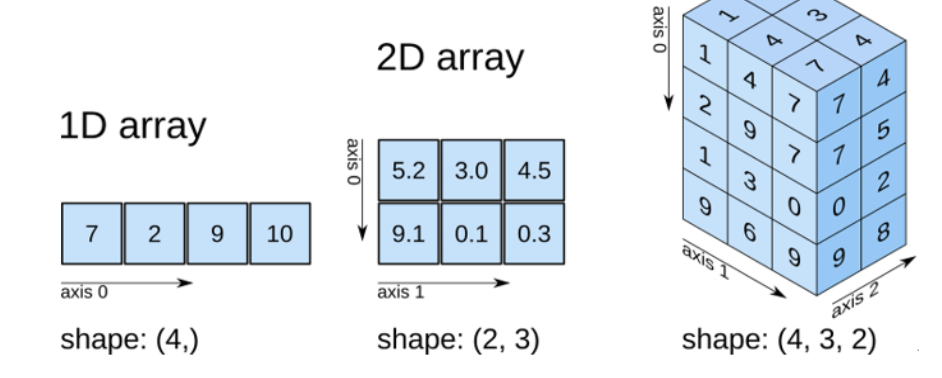
更高维的数据:可以采取降维,
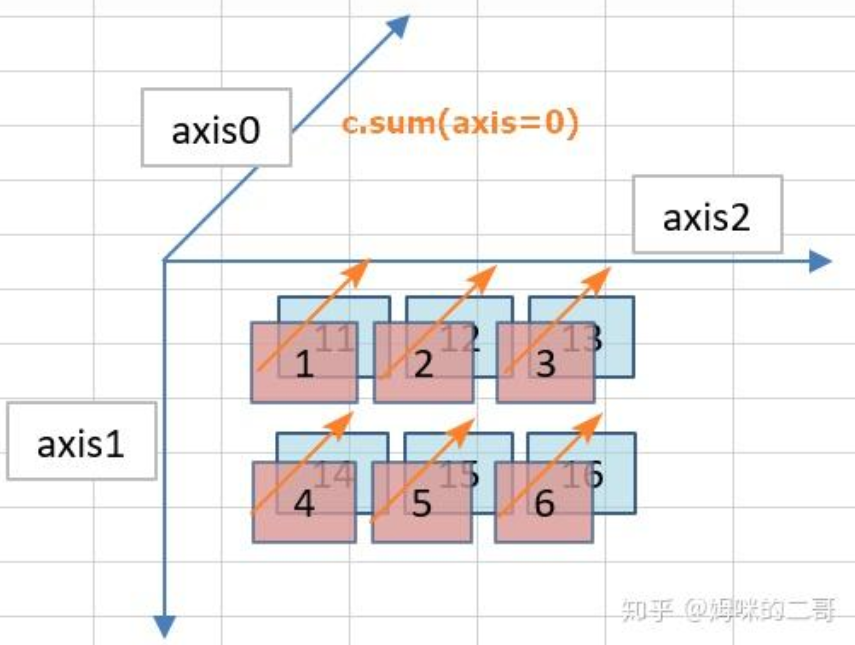
- 创建数据
np.array创建数组
array.ndim返回数组维度 - 添加数据
cars = np.concatenate([cars1, cars2])
test1 = np.array([5, 10, 12, 6]) |
- 合并数据
a = np.array([ |
-
- 还有
np.vstack、np.hstack水平合并,竖直合并
- 还有
- .size获取大小,.shape获取形状元组
- 条件筛选
print(a[a>7]),逻辑:先得到a每个元素的布尔数组,再打印np.where(condition,a,b),把所有符合条件的换成a,不符合的换成b
- 基础运算:
- ±*/在numpy数组中都是逐元素批量运算
- 数据统计分析:
np.max(a)ora.max()都可以a.prod累乘,a.sum()求和,mean,std(标准差),median(中位数)
- 特殊运算符:
np.argmaxornp.argmin返回最值对应的下标np.ceilornp.flour向上/下取整np.clip上下界限截取(控制在上下界之间)
- 改变数据形态
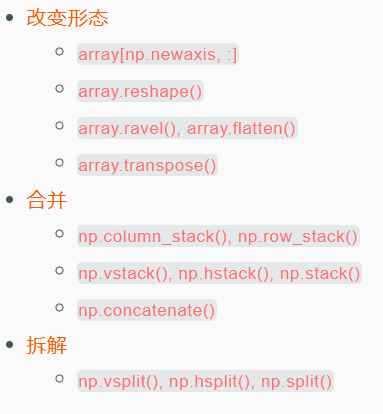
- 一般来说,在数据分析统计,机器学习中的数据,都是以二维来存储的。行是数据样本(第一维度),列是特征(第二维度)。
- 拆解:
a = np.array( |
读取保存数据
读取
np.loadtxt("read-save-data/data.csv", delimiter=",", skiprows=1, dtype=np.int64)
skiprows:跳过第一行 delimiter:分割符np.fromstring(row_string, dtype=np.int64, sep=",")
只能读取一个数值序列
保存
- 保存为通用数据格式
np.savetxt("read-save-data/save_data.csv", data, delimiter=",", fmt='%s') - np特有的二进制格式
np.save("read-save-data/save_data.npy", data)
文件拓展名为npy,可以直接用np.load来读取 - 一个文件中保存多个array
np.savez("read-save-data/save_data.npz", train=train_data, test=test_data)
后面的train,test是自定义的参数,可以在读取该文件时作为索引
np.savez_compressed()压缩更节省空间
标准数据生成
np.full([shape],num),生成shape形状,值为num的array
np.linspace(start,end,num)从start到end中间共num个间隔相等的数据
随机数和随机操作
np.random.rand((shape))
np.random.random([shape])均用于生成[0,1]之间的数
np.random.randn((shape))生成正态分布
np.random.randint(low,high,size)
#对已有数据的随机化处理 |
np.random.shuffle()用于数据重新洗牌:注意可能用到源数据的时候进行备份
np.random.permutation可以直接生成乱序的序列号,或者处理多维数据
np.random.normal(mean,方差,形状)正态分布
np.random.uniform(low ,high ,size)均匀分布
- 随机数种子(当需要两次一模一样的随机初始化时)
(同一个数字产生的随机数相同)
np.random.seed(1) |
pandas
1.creating,reading and writing
creating data
import pandas as pd:常用
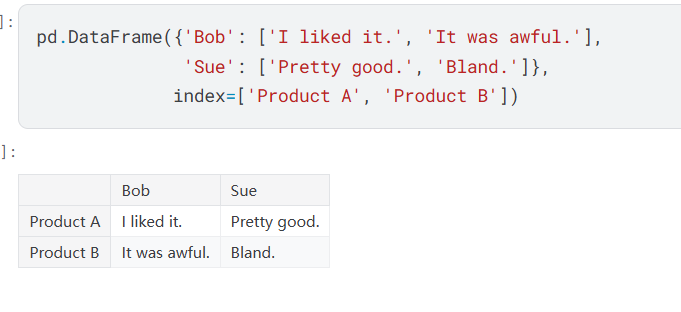
DataFrame:一种表格
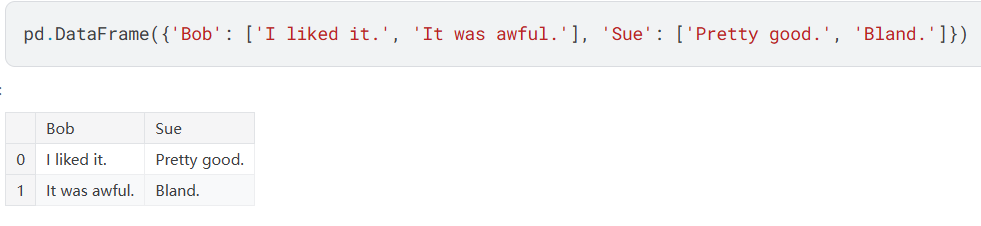
(字典的键是栏目名,而字典的值是entries/条目)
- 可以看到字典的键变成了列标,使用参数指定行标(row)
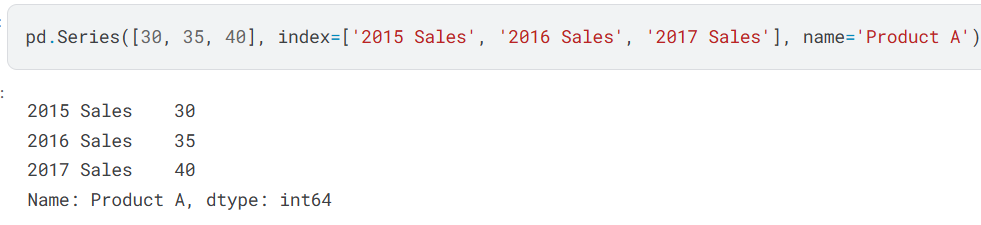
Series:一种列表(本质上是DataFrame的单独一列) - 使用参数指定行标和总的名字
reading data files
csv:So a CSV file is a table of values separated by commas. Hence the name: “Comma-Separated Values”, or CSV.
wine = pd.read_csv("......csv",index_col =0 ) |
ps:注意字典创建的值要用[]!!!
保存为csv:DataFrame.to_csv(‘name of the file’)
2.Indexing, Selecting & Assigning
- 访问某column:
reviews.country/reviews['country']都可以(后者可以用于撞词(这一栏就叫column))
index-based selection(iloc)
- Both loc and iloc are row-first, column-second. This is the opposite of what we do in native Python, which is column-first, row-second.
所以reviews.iloc[0]取第一行reviews.iloc[:,0]取第一列
如果索引是负数:从末尾开始数
label-based selection(loc)
reviews.loc[:, ['taster_name', 'taster_twitter_handle', 'points']]
(最前面也可以是数字)
choosing
iloc uses the Python stdlib indexing scheme, where the first element of the range is included and the last one excluded. So 0:10 will select entries 0,…,9. loc, meanwhile, indexes inclusively. So 0:10 will select entries 0,…,10.
Manipulating the index(操作索引)
reviews.set_index("title")加一行的列名为title
conditional selection
reviews.loc[reviews.country == 'Italy' & reviews.point >= 90]
返回其country词条为意大利,得分90以上的词条
reviews.loc[reviews.coutry.isin(['Italy','France'])]判断是否在里面
reviews.loc[reviews.price.notnull()]返回不是空缺的地方(也有isnull())
ps:
1.sample_reviews = reviews.iloc[[1,2,3,5,8]]注意取多项的时候整体作为一个列表传入
2.df = reviews.loc[[0,1,10,100],['country','province','region_1','region_2']],传入两个列表,逗号隔开
3.top_oceania_wines = reviews[(reviews.points >=95) & ((reviews.country == 'Australia')|(reviews.country == 'New Zealand'))]比较运算符,永远括起来才不会出错!!!
3.Summary functions and maps
summary function
#对数字 |
reviews.points.unique(),有多少个
reviews.points.value_counts频数统计图
maps(映射)
#第一种map方式 |
内置:
reviews.points+'-'+reviews.countrys用-符号将两组Series连接起来
ps:
pandas.DataFrame.idxmax()返回指定轴上最大值出现的第一个索引
n_trop = reviews.description.map(lambda desc: "tropical" in desc).sum() |
4.grouping and sorting
groupwise analysis
- groupby():You can think of each group we generate as being a slice of our DataFrame containing only data with values that match. This DataFrame is accessible to us directly using the apply() method, and we can then manipulate the data in any way we see fit.
- 以下两行等效
reviews.groupby('points').points.count()
reviews.points.value_counts()
e.g:返回不同国家和省份之间最好的酒
reviews.groupby(['country', 'province']).apply(lambda df: df.loc[df.points.idxmax()]) - groupby()的一个method:agg(),可以同时使用多个方法``agg([len,max,min])`
multi_indexes
e.g:
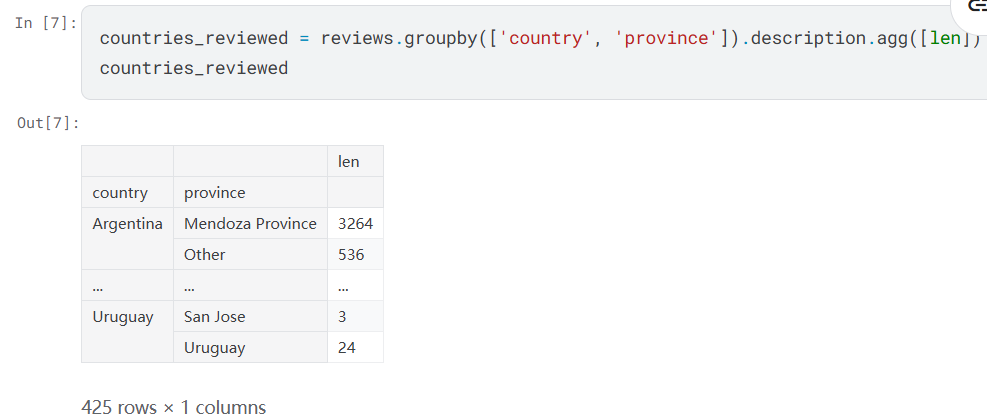
reset_index()重置回常规的index
sorting
groupby()的输出的顺序是基于index的大小,使用countries_reviewed.sort_values(by='len')可以解决(默认升序,可以用ascending=False参数来调整)
也有sort_index(),可以对by传入一个参数列表,同时使用多个排序依据
sorted_df = df.sort_values(by=['A', 'B'], ascending=[True, False])
两列
country_variety_counts = reviews.groupby(['country','variety']).size().sort_values(ascending = False)
什么组合最常见!
5.datatype and missingvalues
- type 变成了dtype
- Series.dtype返回该column的类型
- 当一个Series全是字符串的时候,它的dtype是object
- 类型转换
astype("float64")
missing data
- NAN总是float64类型的
pd.isnull()pd.notnull()选出含或不含nan的条目pd.fillna()填充,也可以用pd.replace()
ps:
reviews_per_region = reviews.region_1.fillna('Unknown').value_counts().sort_values(ascending=False)
6.renaming and combining
reviews.rename(columns={'points': 'score'})#points->score
reviews.rename(index={0: 'firstEntry', 1: 'secondEntry'})#参数很多种,字典最方便
reviews.rename_axis("wines", axis='rows').rename_axis("fields", axis='columns')
行索引和列索引都可以有自己的name属性。可以使用附加的rename_axis()方法来更改这些名称。
combining
pd.concat([canadian_youtube, british_youtube])#沿着特定的轴将其连接起来
left = canadian_youtube.set_index(['title', 'trending_date']) |
word
embed:嵌入
syntax:句法,规则
ascend:升高,攀登
intimate:亲密的
well-endowed:天赋好的
property:所有物,特性
syntactically 在语法构成上
novice:初学者
custom:自定义的
built-in:内置的
simultaneously:同时
tiered:阶梯式的,分层的
thereof:其中
complimentary 赞美的
suffix:后缀